The short answer
Yes. Foreigners can use PayPay, and you do not need a Japanese bank account, a Japanese credit card, or even a Residence Card to get started.
You need exactly one thing: a Japanese mobile phone number that can receive SMS.
That single requirement is where almost everyone gets stuck — because the SIM or pocket WiFi most people buy for Japan does not come with one.
Which situation are you in?
- Still preparing to move to Japan → Start with “The one requirement” below. Sorting this out before you fly saves you a frustrating first week.
- Already in Japan and PayPay won’t let you register → It is almost certainly your phone number. Jump to “What does not work”.
- Visiting Japan for a short trip → You probably don’t need PayPay at all. See “If you’re only visiting” below.
Why PayPay matters if you’re living in Japan
PayPay is not one option among many. It is the default.
As of August 9, 2026, PayPay passed 75 million registered users — more than one in two people in Japan, and roughly three out of four smartphone users in the country. Over 43 million of those users have completed identity verification.
Japan is often described as cashless now, and that is half true. Department stores, chains and convenience stores take international credit cards. But thousands of small ramen shops, izakayas, family-run cafés, market stalls and neighbourhood clinics refuse cards outright, because card processing fees eat their margins.
What those places do accept is a laminated PayPay QR code taped to the counter.
This creates a very specific reality for foreign residents: the cheapest, most interesting, most local places in Japan are cash or PayPay only. Without PayPay you are either carrying cash constantly, or you are eating at chains.
PayPay also solves three problems that hit foreign residents harder than locals:
- Splitting bills. Send money to friends instantly, to the exact yen, with no fee.
- The coin problem. Japanese cash generates an absurd quantity of 1-yen and 5-yen coins. PayPay ends this.
- The app is fully in English. Unlike most Japanese payment apps, you can switch the entire interface.
If you’re only visiting Japan for a week or two
Be honest with yourself here: PayPay is probably not worth it for a short trip.
To register you need a Japanese phone number, and Japanese phone plans are billed monthly. Paying a setup fee plus a full month for a nine-day holiday makes little sense.
The good news is that you may not need PayPay at all.
PayPay has spent years connecting overseas wallets to its merchant network. As of June 2026, PayPay merchants accept 35 payment services from 17 countries and regions, covering roughly 80% of inbound visitors to Japan by nationality. That includes Alipay and WeChat Pay (China), Kakao Pay, NAVER Pay and Toss (Korea), JKO PAY and iPASS MONEY (Taiwan), GCash (Philippines), TrueMoney (Thailand), Touch ‘n Go (Malaysia), MoMo and ZaloPay (Vietnam), Octopus and AlipayHK (Hong Kong), and several more.
In practice: at a shop displaying a PayPay QR code, open your own country’s payment app and scan the same code. You enter the amount in yen and it converts automatically.
So if you’re a tourist, use what you already have.
Everything below is for people who are moving to Japan — students, working holiday visa holders, company transfers, and long-stay remote workers. For you, the maths is completely different, and so is the conclusion.
The one requirement: a Japanese phone number
PayPay’s official help page states it plainly: overseas mobile phone numbers cannot be used, and a Japanese mobile number is required. Account registration requires a smartphone on a contract capable of receiving an SMS verification code.
There is no workaround. No email registration, no passport-based signup, no “verify by post” option.
Here is where this trips people up. Most connectivity options sold to foreigners heading to Japan do not include a Japanese phone number:
| What you might buy | Japanese phone number? | Can you register PayPay? |
|---|---|---|
| Pocket WiFi router | ❌ None (it’s a WiFi box) | ❌ No |
| Tourist data-only eSIM (Airalo, Holafly, Ubigi etc.) | ❌ Data only, no voice/SMS number | ❌ No |
| Roaming on your home SIM | Home country number only | ❌ No |
| VoIP / 050 number (Skype etc.) | ❌ Not a mobile number | ❌ No |
| Japanese voice + data SIM or eSIM | ✅ 070 / 080 / 090 | ✅ Yes |
An important clarification, because a lot of articles get this wrong: the problem is not eSIM technology. eSIMs are fine. The problem is data-only plans.
A tourist eSIM gives you internet but no phone number, so there is nothing for PayPay to send a code to. A Japanese voice eSIM gives you a real 070/080/090 number and works. Same technology, completely different outcome.
Ask one question about any plan you’re considering: “Does this come with a Japanese phone number that receives SMS?” That’s the only thing that matters.
We put that question directly to two providers that specialise in foreign residents — Mobal and Sakura Mobile. Their answers are in the comparison further down.
Get Your Japanese Number SIM Card → Not sure which? Dial *#06# — if a 32-digit EID appears, your phone takes an eSIM.
Sakura Mobile Get Your Japanese Number eSIM / SIM Card → Voice + Data plan. Pick it up at the airport or the Shinjuku office with your passport. Both give you a real 070 / 080 / 090 number, so SMS verification works. Month-to-month, no cancellation fee.
What does not work (and why your registration is failing)
If PayPay is rejecting you, it’s one of these:
Your number is from your home country. Not accepted, regardless of country.
You have a 050 or VoIP number. Internet phone numbers from Skype and similar apps cannot receive the carrier SMS that PayPay’s anti-fraud system requires.
Your SIM is data-only. Very common. People buy an unlimited data plan, arrive, and discover half of Japanese life is locked behind SMS verification.
You’re trying to register from outside Japan. PayPay does not allow new registration or identity verification from overseas.
And here is the part nobody tells you before you arrive: PayPay is not the only thing that will demand SMS verification.
A Japanese mobile number is what unlocks your bank account application, your ward office registration, LINE, Uber Eats and Demae-can, Mercari, apartment applications, part-time job applications, hospital bookings, and concert ticketing. PayPay is simply the first wall you hit. It will not be the last.
How to set up PayPay: 5 steps
Step 1 — Get a Japanese phone number
Do this first. Nothing else works until it’s done. If you don’t have a Japanese number yet, order a voice + data SIM or eSIM from Mobal or Sakura Mobile — see the comparison below for which fits you.
Get Your Japanese Number SIM Card → Not sure which? Dial *#06# — if a 32-digit EID appears, your phone takes an eSIM.
Sakura Mobile Get Your Japanese Number eSIM / SIM Card → Voice + Data plan. Pick it up at the airport or the Shinjuku office with your passport. Both give you a real 070 / 080 / 090 number, so SMS verification works. Month-to-month, no cancellation fee.
Step 2 — Download the app and register
Download PayPay from the App Store or Google Play, ideally once you’ve arrived in Japan. Enter your Japanese mobile number, receive the SMS code, enter it, set a password, and turn on Face ID or fingerprint login.
That’s the entire registration. No ID document required at this stage.
Step 3 — Switch the app to English
Tap アカウント (Account) at the bottom right → 設定 (Settings) → 言語 (Language) → English.
The whole interface switches immediately, including your transaction history.
Step 4 — Load money onto your account
See the next section — this deserves its own explanation, because the rules changed very recently.
Step 5 — Pay in a shop
There are two checkout styles, and you’ll meet both on your first day.
Store scans you — convenience stores, supermarkets, big chains.
Say “PayPay de” (PayPayで), tap Pay to show your barcode, and let the cashier scan your screen. You’ll hear the PayPay chime.
You scan the store — small izakayas, independent ramen shops, market stalls.
Say “PayPay de”, tap Scan, scan the QR code stand on the counter, type in the total yourself, show the screen to the staff, and tap to pay.
One thing worth saying clearly: do not be nervous about this.
PayPay handles over 8.8 billion transactions a year in Japan — around one in five of all cashless payments in the country. Every cashier does this hundreds of times a week. If you hesitate or tap the wrong thing, they will simply point at the right button. In Tokyo and Osaka in particular, many convenience store staff are foreign residents themselves and often speak English. Just say “PayPay de” and hold up your phone.
Putting money in: why cash is now the smartest route
This is the section most guides get wrong, and as of this month it’s badly out of date almost everywhere.
Foreign credit cards cannot be linked
PayPay does not accept overseas-issued Visa, Mastercard or Amex for linking to your account. This has been true for years.
And as of September 2026, even Japanese cards changed
On July 1, 2026, PayPay introduced a system called “他社カード利用券” (other-company card vouchers). The previous method — registering a non-PayPay credit card and paying directly from it — ends at the end of August 2026. From September, holders of other Visa and Mastercard credit cards must first purchase a voucher inside the app and then spend that. (Personal credit cards issued by Sumitomo Mitsui Card are an announced exception and continue with the old method.)
What this means for you: the credit card route into PayPay has become more complicated for everyone, including Japanese users. Meanwhile the cash route has not changed at all, costs nothing, and works from day one.
The method that actually works: cash at a convenience store ATM
You can load cash directly onto PayPay at Seven Bank ATMs (7-Eleven) and Lawson Bank ATMs. You do not need an account with either bank, and there is no fee.
- Find a Seven Bank or Lawson Bank ATM. There are over 20,000 7-Elevens in Japan.
- On the ATM screen, select スマートフォンでの取引 (Smartphone transaction) or チャージ / QRチャージ.
- In the PayPay app, tap Charge, then ATM Charge, and scan the QR code shown on the ATM.
- Wait for a company number to appear in your app, then type that number into the ATM.
- Insert banknotes (¥1,000 and up — coins are not accepted, and older Lawson ATMs may not give change).
- Confirm. Your balance updates instantly.
⚠️ Do not type a company number from memory or from another guide. PayPay specifically warns that entering it before the app displays it will cause the charge to fail. Always wait for your own app to show the number.
The complete workflow if you have no Japanese bank account yet:
Walk into a 7-Eleven, withdraw cash from the same ATM using your home country’s Visa or Mastercard, then immediately load that cash into PayPay at that machine. Two operations, one ATM, about three minutes.
Be aware that your home bank will charge its own international withdrawal fee and exchange rate for that first step, so withdraw in reasonable amounts rather than ¥3,000 at a time.
SIM and eSIM providers that work with PayPay
You need a Japanese voice number. Two providers specialise in foreign residents and can be arranged before you arrive, without a Japanese bank account. Rather than guess, we emailed both and asked them directly whether their numbers work for PayPay’s SMS verification.
What Mobal told us
We contacted Mobal’s sales team on August 30, 2026 and asked whether their numbers can be used to register for PayPay. Their reply confirmed that their Voice + Data 5G eSIM/SIM products come with a Japanese mobile phone number, and that this number can generally be used for SMS verification services such as PayPay.
They also noted that their latest Voice + Data 5G eSIM/SIM supports international roaming as an optional add-on, which can be enabled at activation or later from your Mobal account — useful if you want the number working before you land in Japan.
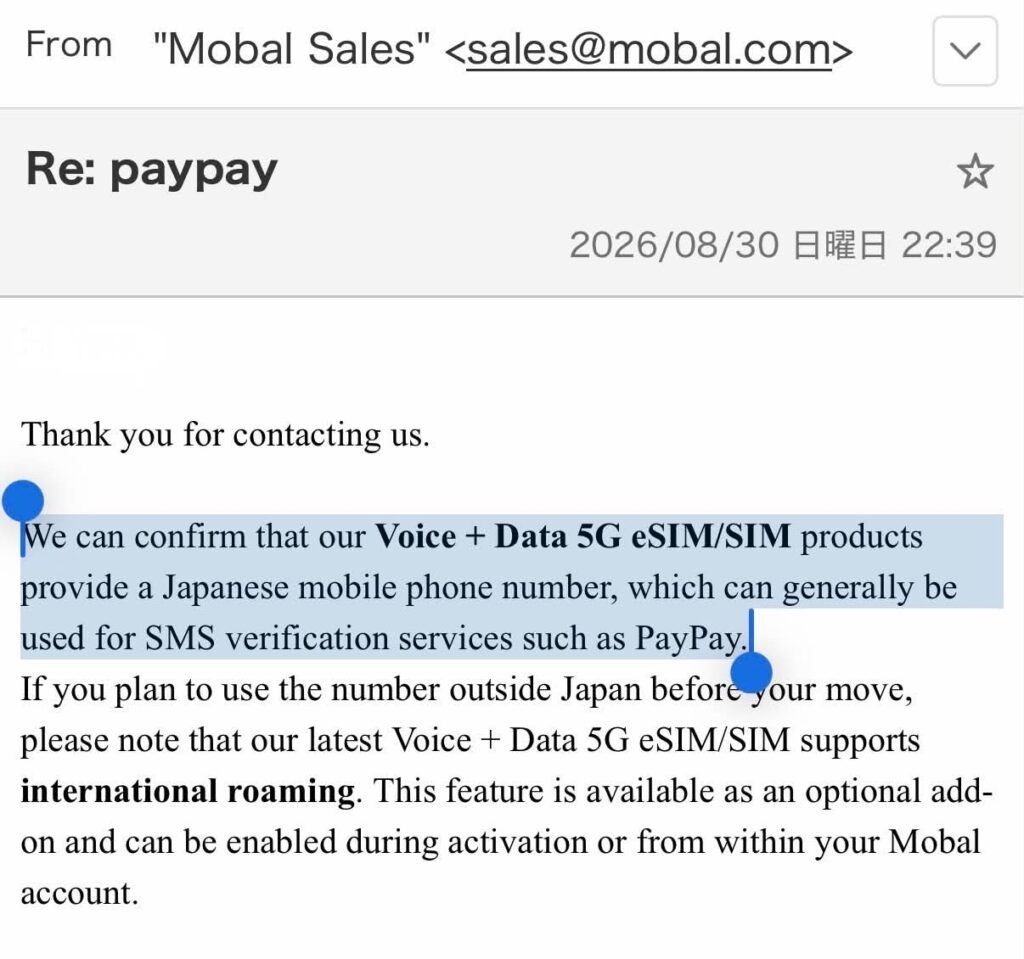
Note the specific product named: Voice + Data. That is the plan we can point to with a direct confirmation behind it, and it’s the one we recommend.
| Mobal | Sakura Mobile | |
|---|---|---|
| PayPay SMS verification | ✅ Confirmed by Mobal, Aug 30, 2026 (Voice + Data 5G) | 【返信待ち】 |
| Japanese phone number | ✅ Yes (Voice + Data plans) | ✅ Yes (voice plans) |
| SIM and eSIM | Both available | Both available |
| Voice + data plan | 【最新価格を記入】 | 【最新価格を記入】 |
| International roaming | ✅ Optional add-on | 【要確認】 |
| Payment method | Overseas credit card / PayPal | 【要確認】 |
| Japanese bank account needed | ❌ No | ❌ No |
| Order before arriving | ✅ Yes | ✅ Yes |
| Pick-up options | Same-day pick-up locations nationwide【要確認】 | Airport or Shinjuku office (passport required) |
| English support | ✅ Yes | ✅ Yes |
| Contract length | Month-to-month【解約金の有無を要確認】 | Month-to-month【解約金の有無を要確認】 |
| Minimum age | 18+ for voice SIM/eSIM | 【要確認】 |
Which should you choose?
We recommend Mobal’s Voice + Data 5G eSIM or SIM, for a simple reason: it is the one product we have a dated, written confirmation for. Mobal also publicly documents PayPay compatibility in their own materials, sells to foreign residents without requiring a Japanese bank account, and is 100% charity-owned, with profits directed to charitable causes.
Consider Sakura Mobile if you’d rather collect your SIM in person and have someone walk you through the setup. You can pick it up at the airport or at their Shinjuku office with your passport, which is reassuring on day one if you’d rather not troubleshoot activation alone in a hotel room.
One caution on cheaper voice-only plans. Some providers sell a stripped-down plan with a phone number but no mobile data. In principle a number is a number, but the confirmation we received from Mobal names the Voice + Data product specifically, so that is what we point you to. If you want to go cheaper, ask the provider about your exact plan before ordering rather than assuming.
Get a Japanese number before you fly
Mobal — Voice + Data 5G, confirmed to work with PayPay SMS verification
Get Your Japanese Number eSIM →
Get Your Japanese Number SIM Card →
Not sure which? Dial *#06# — if a 32-digit EID appears, your phone takes an eSIM.
Sakura Mobile — in-person pick-up at the airport or Shinjuku
Get Your Japanese Number eSIM / SIM Card →
Voice + Data plan. Pick it up at the airport or the Shinjuku office with your passport.
Both give you a real 070 / 080 / 090 number. Month-to-month, no cancellation fee.
These are affiliate links.
Get Your Japanese Number SIM Card → Not sure which? Dial *#06# — if a 32-digit EID appears, your phone takes an eSIM.
Sakura Mobile Get Your Japanese Number eSIM / SIM Card → Voice + Data plan. Pick it up at the airport or the Shinjuku office with your passport. Both give you a real 070 / 080 / 090 number, so SMS verification works. Month-to-month, no cancellation fee.
What NOT to buy
Data-only tourist eSIMs (Airalo, Holafly, Ubigi and similar). They are excellent value for internet access and completely useless for PayPay. If you’re moving here, a data-only plan will fail you within your first week.
Pocket WiFi. Same problem, plus a device to carry and return.
The rest of the evidence
Beyond the confirmation above, here is what the public record shows, with dates:
Mobal states it in their own materials. Their published guides walk through registering for PayPay — download the app, register with a Japanese number, enter the confirmation code — and their FAQ confirms that a Japanese phone number is required for PayPay.
A user report on X (September 2024): an English-speaking user in Japan described getting a Mobal phone number, signing up for PayPay without trouble, then withdrawing cash at a 7-Eleven ATM with a foreign Visa and depositing it into PayPay — the exact workflow described above.
Tokyo Cheapo has reported that Japan’s QR payment apps are unavailable to visitors without a Japanese mobile number, and identified Mobal as the tourist SIM offering a local number with calls and SMS.
AtaDistance, a long-running blog covering Japanese payment systems, has documented creating a PayPay account via SMS verification on a Mobal SIM.
Being straight with you: Mobal’s wording was that their number “can generally be used” for services like PayPay — a sensible hedge, since PayPay controls its own verification system and can change it. The user reports above date from 2023–2024. None of this is a guarantee for your specific handset and plan. If PayPay is the deciding factor in your purchase, email the provider and ask about the exact plan you’re about to buy. Both answer in English.
Also, ignore any guide recommending MobalPay. That service closed on April 27, 2026. A lot of English-language advice about PayPay still references it.
Optional but recommended: identity verification (eKYC)
Once you have your Residence Card (在留カード) — issued at the airport if you’re staying more than 90 days — you can complete identity verification in the app.
PayPay accepts three documents from foreign nationals whose period of stay is not indefinite: a My Number Card, a Residence Card, or a Special Permanent Resident Certificate. You select your nationality and residence status during the process.
How: Account → Identity Verification. Scan your card’s IC chip with your phone’s NFC reader and complete the face photo check. Results can come the same day; document-photo applications may take a few days.
What it unlocks:
- Linking a Japanese bank account and charging directly from it
- Withdrawing your PayPay balance back to a bank account
- Paying taxes and utility bills by scanning the barcode on the invoice
- Higher transaction limits
And since June 2, 2026, one more: users who have not completed verification are excluded from PayPay Step point rewards. If you want the cashback and points everyone talks about, verification is no longer optional.
Note: you can send money and split bills with friends before verifying — that balance is classified as PayPay Money Light, which transfers fine but cannot be withdrawn to a bank account.
Frequently asked questions
Can I register on a tourist visa?
Only if you have a Japanese mobile number with SMS. The visa itself isn’t checked at registration. But for a short trip, use your home country’s payment app at PayPay merchants instead.
Can I activate my Japanese number before I arrive in Japan?
With Mobal’s Voice + Data 5G eSIM/SIM, international roaming is available as an optional add-on that can be switched on at activation or later from your account, so the number can work before your move. Note separately that PayPay itself does not allow new account registration from overseas — so activate the number early if you like, but plan to register the app after you land.
I have a Japanese number but no SMS is arriving.
Check that your plan includes SMS — some cheap Japanese plans are data-only with no messaging. Also confirm your device’s date and time are set to automatic, which PayPay requires. And check whether the number was previously registered to a PayPay account; a closed account blocks re-registration of the same number for 180 days.
Do I need a Residence Card to sign up?
No. A Japanese phone number is enough to register and pay. The Residence Card is for identity verification later.
PayPay or Suica?
Both. Suica is unbeatable for trains and vending machines but caps at ¥20,000 and isn’t accepted at most independent restaurants. PayPay covers the shops and restaurants Suica doesn’t. They don’t compete.
What happens to my balance when I leave Japan?
If you’ve completed identity verification, you can withdraw your balance to a Japanese bank account before closing it. If you haven’t verified, your balance is PayPay Money Light and cannot be cashed out — so spend it down before you go.
Does PayPay work without internet?
No. It needs a live connection to generate your barcode. In basement restaurants with poor reception this can fail, so keep a ¥1,000 note in your wallet as backup.
Can I use PayPay outside Japan?
There is an overseas payment mode for certain countries, but it requires identity verification completed while you are inside Japan. 【対象国と最新条件を要確認】
In summary
Foreigners can use PayPay. The barrier isn’t your nationality, your visa, or your lack of a Japanese bank account. It’s a phone number.
Sort out a Japanese voice + data SIM or eSIM before you fly, and PayPay takes about five minutes to set up once you land. Buy a data-only eSIM or a pocket WiFi instead, and you’ll spend your first month in Japan paying cash at every small restaurant you want to try — and hitting the same wall again at the bank, the ward office, and every delivery app you download.
It’s one decision, made before departure, that quietly determines how the first month goes.
Ready to sort it out?
Mobal — Japanese Number eSIM →
Mobal — Japanese Number SIM Card →
Sakura Mobile — eSIM / SIM Card →
These are affiliate links.
Get Your Japanese Number SIM Card → Not sure which? Dial *#06# — if a 32-digit EID appears, your phone takes an eSIM.
Sakura Mobile Get Your Japanese Number eSIM / SIM Card → Voice + Data plan. Pick it up at the airport or the Shinjuku office with your passport. Both give you a real 070 / 080 / 090 number, so SMS verification works. Month-to-month, no cancellation fee.